THE NOTIC JOURNAL ·
Notic Meet Agenda Updates
Notic Meet is beginning to make progress again after a few months of being dormant. When I opened the app I realised it just wasn’t inviting. Although its still very sparse, the UI that was there just didn’t look inviting. To help with that, I decided to opt for a smaller left sidebar, a slightly larger centre column, and then the wider detail column whoich is where content will be written. I think I am getting closer to what I want it to look like and how I want it to work.
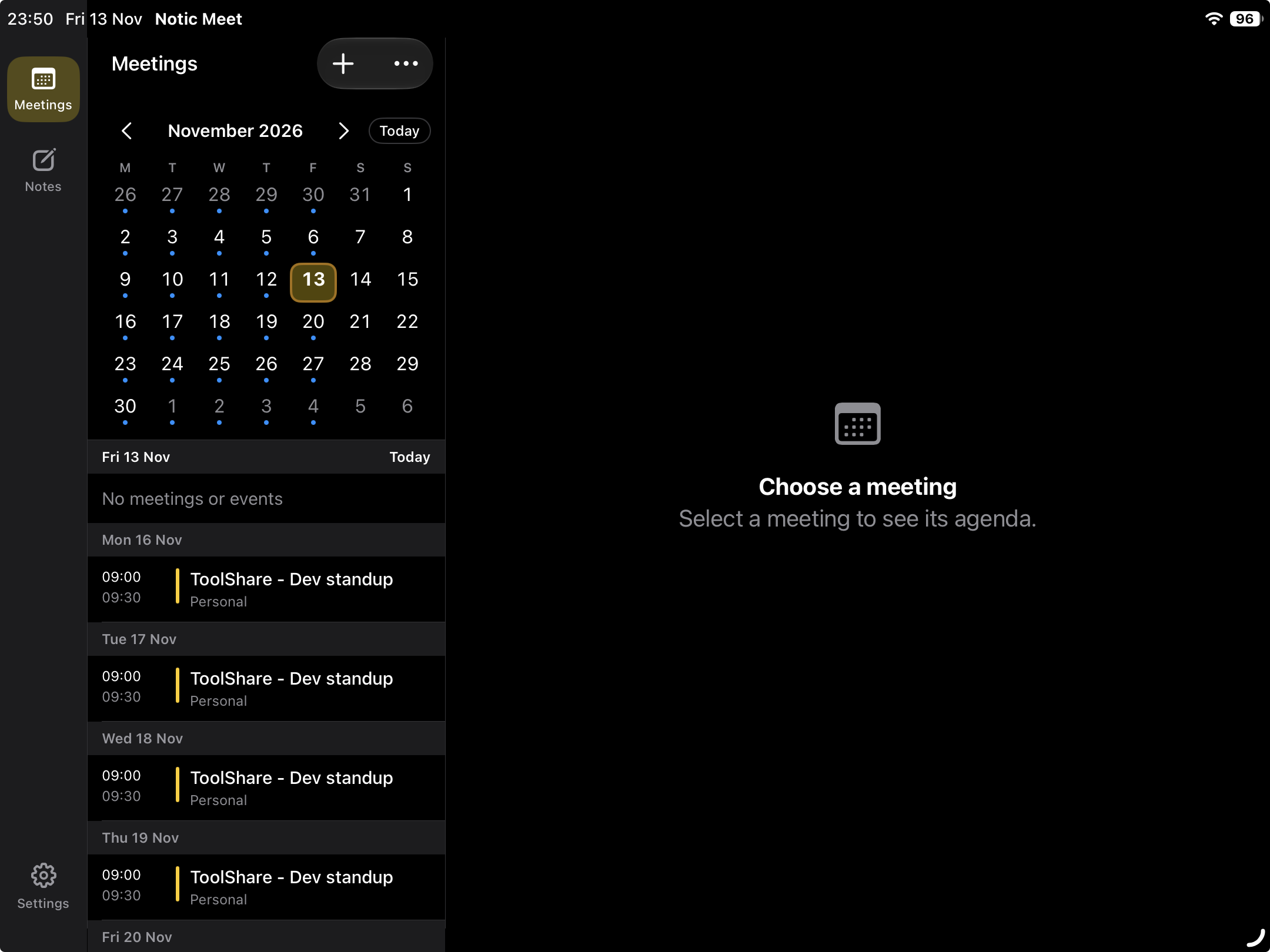
As can be seen in the screenshot above, the left column is now slimmer on iPad although normal size on iPhone. The meetings section where agendas will be planned now has an interactive calendar that connects with your calendar on your Apple device. A seperate modal allows control over what calendar entries you pull in, and if you want a single item or all items in a repeating item. When scrolling the meetings, the yellow outline on todays date glides over to each date in an animated way that is beginning to look very good. On iPhone, each meeting in the calendar also provides haptic feedback when scrolling to add a little more to the experience of the app.
Overall, a success in the UI, although not yet set in stone if this will be launched.
We’re building better meeting notes.
Meet Notic →